
Android Central Verdict
Oakley Meta Vanguard smart glasses have the same tech as Ray-Ban Meta glasses, but tailored to different people and lifestyles. Instead of wearing them in your day-to-day life, Vanguard offers convenient hands-free photos and videos, music, or calling while running, cycling, hiking, fishing, shooting, skiing, or other sports. If your face can withstand the weight, you'll absolutely love these for documenting special occasions while protecting your eyes.
Reasons to buy
- +
Oakley Spheara style masks how large AI glasses can be
- +
Fantastic centered photos and stabilized videos
- +
Loud speakers, 5 mics enable clear calls and music in windy weather
- +
Enough battery life to last for multi-hour events with heavy use
- +
Extra action button for slo-mo or hyperlapse shortcuts
- +
Garmin integration has strong potential
Reasons to avoid
- -
Wear them too long or often, and you'll feel the weight
- -
Not suited for indoor use like Ray-Ban/ Oakley HSTN
- -
No landscape photography and poor low-light photos/ videos
Why you can trust Android Central Our expert reviewers spend hours testing and comparing products and services so you can choose the best for you. Find out more about how we test.
Ray-Ban Meta (Gen 2) and Oakley Meta HSTN smart glasses have wide-ranging styles and lenses to appeal to as many people as possible, blending in with normal glasses and working both indoors and outdoors. Oakley Meta Vanguard has the same tech, but a polar-opposite approach and audience.
You're not wearing these into a museum or on vacation to learn about art and landmarks, nor on a late-evening stroll for music. They're designed (and priced) for athletes who spend hours on trails, slopes, boats, or courses every week, and who want to capture and share epic moments as organically as possible.
While I own and like the Ray-Ban Meta Gen 2s, Vanguard smart glasses appeal to me as a runner, with their IP67 water resistance, longer battery life, nose guards, centered camera, and Action button. My Vanguard review will focus on whether you will similarly love these, or if the weight, price, or photo & video quirks will scare you off.
Oakley Meta Vanguard price, specs, and lenses


Oakley Meta Vanguard smart glasses cost $499, slightly higher than the $379–479 range for other second-gen Meta glasses. It ships in four frame/ lens color combinations: Black frames with 24K gold or Road red lenses, or White frames with Black or Sapphire blue lenses.
You won't find clear, polarized, or Transitions lenses for Vanguard. Unlike Oakley Meta HSTNs and Ray-Ban Meta Gen 2s, these aren't meant for indoor use.

The lens shape precludes a straightforward prescription insert, but a fellow AC writer purchased unofficial Vanguard lens inserts that you attach by swapping out the default nose guards. He said it was "absolutely worth it" for near-sighted athletes.
Overall, you'll find that the Oakley Meta Vanguard specs are quite similar to Ray-Ban Meta (Gen 2) for connectivity and cameras, but it wins for battery life, speakers, and durability.
Category |
Oakley Meta Vanguard |
|---|---|
Materials |
O Matter nylon composite frame, Unobtanium nose pads, Prizm lenses |
Weight |
66g |
Prescription lens support |
None |
Frame colors |
Black, White |
Lens colors |
24K (gold), Black, Road (red), Sapphire (blue) |
Camera |
12MP Ultrawide |
Photo resolution |
3024 X 4032 pixels (Portrait only) |
Video resolution |
1,080p at 30 or 60 FPS, 3K at 30 FPS |
Water resistance |
IP67 |
Speakers |
2X open ear speakers |
Interface |
Touchpad on side, Action button, Meta AI for voice and camera |
Microphones |
Custom 5-mic Array |
Storage |
32GB; about 100+ videos (30 sec) and 1000+ photos |
Connectivity |
Wi-Fi 6E; Bluetooth 5.3 |
Compatibility |
Android; iOS |
Battery |
Up to 9 hours per charge |
Charging (glasses) case |
Up to 36 hours |
Oakley Meta Vanguard: Everything you'll love

Meta smart glasses combine a mic and speaker, camera sensors, and AI smarts in a single package, paired to your phone. The Vanguard design is tailored to loud, sunny conditions and long workouts, but its target audience may already have favorite open-ear workout earbuds, so the threshold to impress them is higher.
In my case, I'll admit that Oakley Meta Vanguard doesn't quite match the targeted, rich volume of my Shokz OpenFit 2+, but it's a much narrower gap than with my 2nd-gen Ray-Bans, and certainly better than bone conduction earbuds.

The high-decibel speakers sound excellent for track sprints, windy trails, or other sporty conditions, with convenient (if finicky) touch controls around the right Oakley logo to pause or skip tracks, raise/ lower volume, or summon Meta AI.
Everything from bass-heavy workout beats to chill audiobooks and phone calls cut through the ambient noise, and the five-mic array ensures my voice comes through clearly on the other end.

For solo hikes, runs, or rounds of golf, my Vanguard glasses can keep me motivated for hours. Meta specifically promises six hours of music playback, though your mileage will vary depending on your volume and photo/ video frequency. In my experience, I saw about 16.7% battery used per hour, though closer to 25% with frequent media captures or AI queries.
Is that enough? For half-marathons or quick treks, absolutely; for an all-day ride or event, or for livestreaming, it's less likely to last. For sports with quick bursts of action, you can top off the battery in the case in off moments, like on a ski lift, if you have a way to carry the bulky case.

The main reason to buy Oakley Meta Vanguard is the convenience of saying "Hey Meta, start recording," or tapping a button, and getting a candid shot without the delay and awkwardness of grabbing and pointing your phone at something.
This applies to other Meta AI glasses, but it's especially useful for athletes, where using a phone is a slow distraction at best and a safety issue at worst. It's no DJI or Insta360 camera for content creators' sustained, high-res shots, but Vanguard is more natural for everyday folks looking to commemorate events and share moments with friends.


Superficially, Oakley Meta Vanguard glasses look better on my face than Ray-Ban or Oakley HSTN glasses, which look thick because their design mimics "normal" sunglasses. The Oakley Spheara design is already huge, hugging your face, so Vanguard's bulky size doesn't stand out.
More importantly, Oakley Meta Vanguard's built-in nose guard prevents downsliding during sweaty runs and steep downward trails, spreading out the weight and pressure evenly. With Ray-Ban Metas, I have to choose between a tighter fit that hugs my head or a more natural fit that constantly slides down my nose.

I also appreciate that Vanguard gives you a second Action button for shortcuts, such as triggering a Hyperlapse or Slow Motion video, or reading out your current pace for a Garmin-tracked workout.
The Hyperlapse option is my preference: I absolutely love saving these sped-up glimpses of my favorite points on the trail, or the beginning of a race, whereas a full video might be boring by comparison.
My sports of choice don't lend themselves to slow-motion videos, but I did test it, and the effect would be cool for something like skiing or mountain biking.
Oakley Meta Vanguard: Garmin integration

I wrote 1,500 words about Garmin integration on Oakley Meta Vanguard, for Garmin watch owners curious about the feature. Rather than copy-paste my findings, I'll reestablish the highlights, good and bad.
Once you sync your Garmin watch to Vanguard, Meta AI will know your real-time workout stats. You can say "Hey Meta, what's my current (or average) pace/ HR/ power/ cadence/ distance?" and receive an answer in seconds. You can ask for stats that aren't in your default Garmin data fields, without taking your eyes off the road.
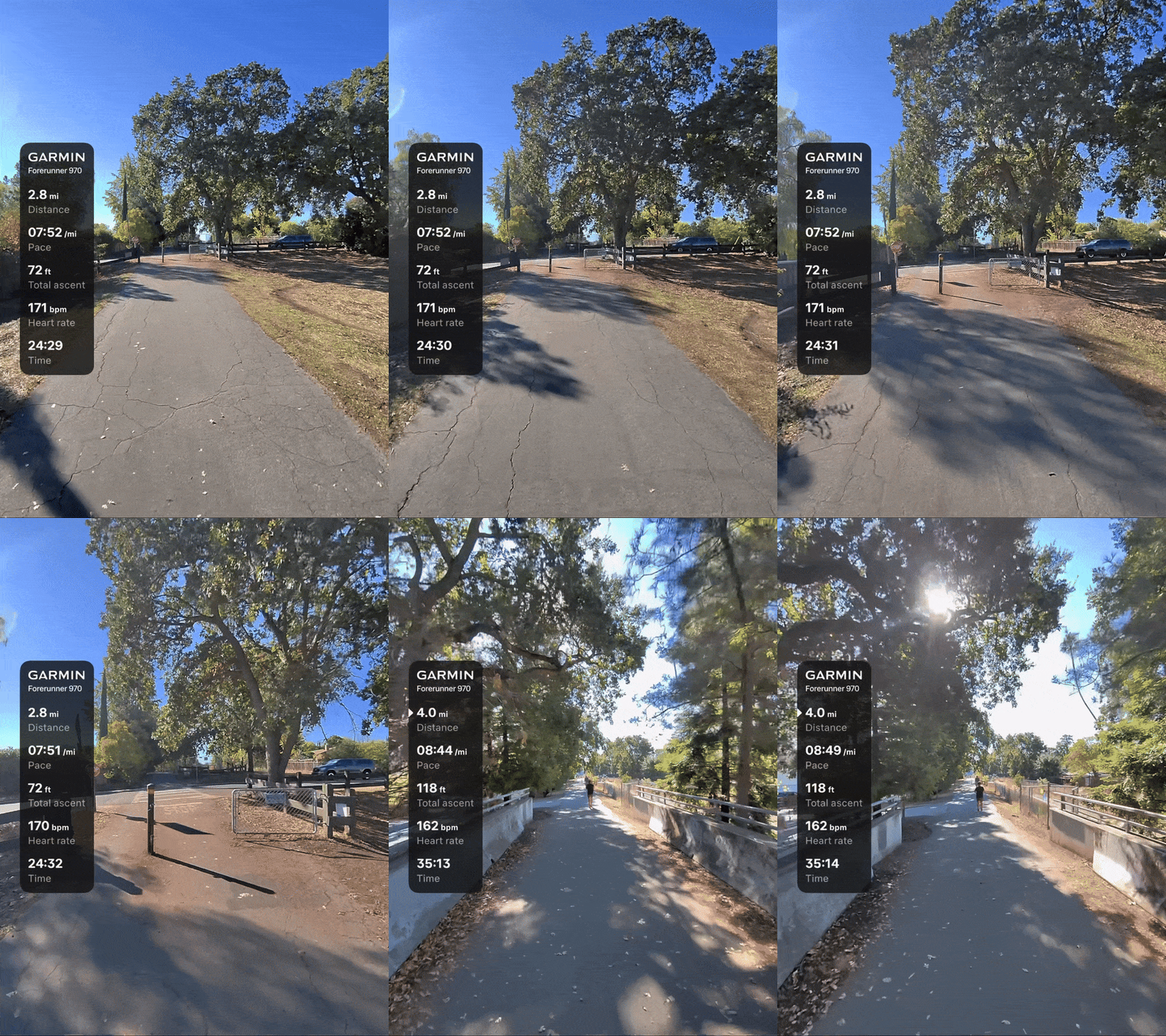
Garmin Autocapture triggers five-second captures at mile markers or other contextual "smart triggers," then collects them into an editable video montage with synchronized Garmin stats displayed.
While Autocapture is well-suited to race events, it's awkward for videos to trigger when other people are walking toward you, and you'll have to delete dozens of random five-second clips from your Photos gallery afterward.
If you're following a Garmin workout with a target zone, the Vanguard's Status LED will light up red when you're off-target. This lets you avoid glancing at your wrist for every out-of-zone or back-in-zone buzz; eventually, I want Meta to show two colors to indicate if you're above or below your target zone.


Lastly, the Meta AI app will create post-workout summaries of how your results compare to past activities, with suggestions on whether to rest from hard runs or incorporate more speedwork after easy ones. I don't find it especially helpful, but novice athletes could benefit, and it's not paid like Garmin Connect+.
Overall, Vanguard's Garmin integration has impressed me, but it's not vital. More Garmin fans will want a HUD for real-time stats, but the Meta Ray-Ban Display design is too heavy for workouts.
Oakley Meta Vanguard: Camera and stabilization test

I took photos from specific spots wearing both my Oakley Vanguard and Ray-Ban Gen 2 glasses. The gallery below shows how Vanguard's shots better center what I was aiming at, though also capturing more incidental stuff around my subject.


I then took out my Oakley Meta Vanguards for a hike, capturing nature photos. I didn't realize that my hat was in the shot until afterward, unfortunately, but you can still see how much wide detail they capture, as well as how they can snap moving targets like a dog or vulture with minimal blurring.


For this third, hatless test, I took more "normal" photos. As with my Ray-Ban Meta camera test, I appreciate the vivid colors and quick-snap captures of moving targets; likewise, I have to accept that without a viewfinder, it's hard to know if I'm standing too far away or should crouch for a better angle.


I don't have a convenient way to embed videos, but 1080p videos give you smoother footage with sufficient details and realism, while 3K mode is more vibrant and detailed with better contrast and minimal compression, but more prone to jittering.
They looked fantastic during my Autocapture setting in sunny weather, but when I did some sprint tests at twilight, the footage was rough, with terrible, shaky blur as the camera failed to fill in details. I'd like to see better nighttime photography on Meta's next-gen glasses.
Meta's auto-stabilization is what makes action videos work, with tools like horizon correction making the footage glide seamlessly. My colleague's video above shows how it looks at different stabilization levels — though Vanguard only lets you customize this setting in 1080p/30FPS mode, for now.
Oakley Meta Vanguard: Everything you won't love

I can comfortably wear Oakley Meta Vanguard glasses for hours, but the 66g of weight concentrated on the nose pads does add up, especially for workouts like running with an up/down, bouncing motion. Even though I wear glasses every day, the Vanguards can make my nose sore after all-day wear, or after shorter workouts on back-to-back days.
If you're hoping to wear these glasses for daily workouts, you might resent the weight; I use them more sporadically, but I also have other workout earbuds and sunglasses for casual runs that I don't care to photograph.

Many of my Ray-Ban Meta review complaints return here, like the noticeable audio spill, poor low-light photography, the hyperfixation on portrait-only photos for Meta's own apps, and Meta AI's limitations. At least audio bleed is less of an issue outdoors where most people are wearing headphones.
As for other nitpicks, Meta should add EQ presets or customization to optimize Vanguard's speakers. And while Meta has a Find My option with your glasses' last location, I wish the case had a way to ping it audibly.
Competition

If you bought Oakley Spheara sunglasses, wireless earbuds, and a cheap sports camera, you'd spend slightly more, but get a lighter fit, specialized audio tools, and targeted video with a viewfinder. Oakley Meta Vanguard is about the wearable convenience of capturing hands-free footage and only having one device to charge.
If you choose Ray-Ban or Oakley HSTN glasses with Transitions lenses, you can use them indoors or for nighttime runs. These models have slightly shorter battery life, worse water resistance, quieter speakers, no action button, and an offset camera sensor. But they otherwise give you the same AI and software perks.
Garmin cyclists might scoff at Vanguard because it lacks a HUD. But current HUD glasses are either too heavy or quite limited; ENGO 2 glasses, for example, have no music, photo, or AI capabilities.
Oakley Meta Vanguard: Should you buy them?

You should buy Oakley Meta Vanguard if...
- You want to document your favorite athletic moments, whether for yourself or others.
- You need open-ear audio and strong eye protection for long, safe workouts.
- You're interested in the Meta-Garmin integration.
You shouldn't buy Oakley Meta Vanguard if...
- You haven't tried them on first to judge the weight.
- You want to wear these indoors or at night for music or AI.
- You only want smart glasses with a HUD.
If it isn't apparent from this review, I really like my Oakley Meta Vanguard smart glasses. I'm capturing more footage of my races and hikes that I'll enjoy looking back on years from now, and I'm more likely to use these than past smart glasses because I know the battery won't die mid-workout.
Meta consistently updates its products years after release, and is currently porting Vanguard features to its first-gen Ray-Bans. So I'm confident that Vanguard glasses will continue to receive new features that improve the experience; in particular, I think the Garmin partnership will improve with more stats and better shortcuts.
If you're at all interested in what Vanguard has to offer, I think they're worth buying. But if you're scared off by the weight or don't like Vanguard's wide portrait photography, you should look elsewhere. Maybe try them on at a Sunglass Hut or electronics store first and see what you think.

Wearable perks
Oakley Meta Vanguards have stylish Prizm lenses, powerful speakers paired with five mics, high-resolution portrait photos, 3K or 60FPS videos, and Garmin watch integration for workouts.
FAQ
Can you use Oakley Meta Vanguard without a phone?
You can take photos and videos using Oakley Meta Vanguard (or other Meta smart glasses) without your phone on hand, but you'll need to sync it eventually for post-processing and uploading. Every other Vanguard feature (music streaming, Meta AI, Be My Eyes, etc.) requires your phone on hand, and there's no standalone LTE capabilities.
What are the Oakley Meta Vanguard button and touchpad shortcuts?
Swipe forward or backward on Vanguard's right temple touchpad to raise or lower the volume, respectively. Tapping once plays or pauses your phone's music; a double tap or triple tap skips ahead or back in your playlist. Tapping-and-holding summons Meta AI by default, though you can customize this to activate other apps like Audible or Spotify.
Oakley Meta Vanguard has two buttons. You press the main capture button to take a photo, or hold it down to start a video recording, then press it again to end the video. The second Action button can be customized to trigger Hyperlapse or Slow Motion videos, Be My Eyes mode, or Garmin Autocapture mode, or to read out specific Garmin stats (HR, duration, distance, or pace) during a workout.
How do I use my Garmin watch with Oakley Meta Vanguard?
You must install the Meta AI Connect IQ app on your Garmin watch; that link shows which watches and Edge computers are compatible, but it's mostly models from the last few years, excluding cheaper or slower models like the Instinct 3.
In the Meta AI app, tap the Settings cog next to your Vanguard glasses, open App connections, tap Garmin, then "Connect Garmin." It'll show step-by-step directions, including installing the above app; you'll need to ensure that the Meta AI app is installed for each Garmin activity profile (like Run or Bike) before your Vanguard glasses will recognize your stats for that activity.
Are Oakley Meta Vanguard glasses "waterproof" or water resistant?
While they have an IP67 rating — which means they are "protected against the effects of temporary immersion in water" — Oakley Meta Vanguard aren't meant for swimming or other water sports. They'll handle sweat and rain, but you should still dry them off before putting them in the case.
Meta warns that you shouldn't rinse them under a sink to clean them, use them for high-speed water sports, or wear them in high-humidity areas like saunas. And the charging case has no IP rating, so you should be very careful not to get it wet.

