
Don't underestimate the power of the best cheap Android tablets. Despite making a few compromises, they manage to pack plenty of value and serve as excellent companions for home and light office use. Options range from large and small screen sizes, keyboard and stylus compatible ones, and usually, stereo speakers to elevate your entertainment content consumption.
No matter your use case, we've rounded up some of the best Android tablets that you should consider. Our top pick is the Samsung Galaxy Tab S10 Lite because it offers features such as S Pen support, a fantastic display, and seven years of OS and security updates in a well-designed device. You can also consider the Samsung Galaxy Tab A11 if you're in the market for a compact tablet that works well for basic tasks, or the Xiaomi Redmi Pad 2 Pro for unbeatable battery life.
There are many other fantastic options that are ideal for kids, productivity-centric tasks, and a lot more, and we've highlighted the best of them here.
Best overall

The Samsung Galaxy Tab S10 Lite is a well-rounded Android tablet that works exceptionally well for the basics. Often available for less than $300, it's ideal if you're looking for a decent product that won't break the bank.
Having a 10.9-inch TFT LCD panel, the Galaxy Tab S10 Lite is good enough for tasks such as multimedia consumption and document creation. Sure, the resolution isn't exactly the best, but you do get a 90Hz refresh rate for smooth on-screen interactions. Powering the device is the Exynos 1380, an SoC that you'll also find in some of the best cheap Samsung phones. out there You also get up to 8GB of RAM and up to 256GB of internal storage, along with microSD expansion. One of the best things about the Galaxy Tab S10 Lite is its support for the S Pen, which lets you jot down notes, doodle, and do a lot more for on-the-go productivity. The tablet runs Android 15 out of the box and will receive up to seven years of major OS and security updates, so it's a device you can use for years to come.
Talking about connectivity and I/O, the Samsung Galaxy Tab S10 Lite comes with all the essentials, but unfortunately no 3.5mm audio port. You do get three color options to select from, with an 8,000mAh battery rounding off the spec sheet.
Best small screen

Compact yet feature-laden, the Samsung Galaxy Tab A11 is ideal for those who don't want to lug around an unwieldy tablet with them everywhere. But despite its small physical footprint, this thing offers quite a lot of goodies at an extremely reasonable price.
Built around an 8.7-inch TFT LCD screen, the Galaxy Tab A11 makes everything from watching movies/TV shows to reading e-books to just browsing an enjoyable experience. The panel has decent quality, and it comes with a 90Hz refresh rate for smooth interactions. Under the hood, the Galaxy Tab A11 features a MediaTek Helio G99 chipset, with up to 8GB of RAM and up to 256GB of internal storage. With these, it certainly can't compete against the best Android tablets in the business, but lightweight everyday tasks shouldn't be an issue. What truly makes this affordable tablet stand out is Samsung's promise of seven years of major OS and security updates, which means that the Galaxy Tab A11 will serve you for a very long time.
In terms of connectivity and I/O options, you get Wi-Fi, Bluetooth, USB-C, and the good ol' 3.5mm audio port. The tablet has an 8MP rear camera and a 5MP front-facing unit, and it's backed by a 5,100mAh battery.
Best value

If you want to get into the Amazon ecosystem, the Amazon Fire HD 8 (2024) is a great and affordable way to do so. You'll get a solid HD display with either 32GB or 64GB of expandable storage, and up to 13 hours of battery life. The new 2024 model replaces the Fire HD 8 Plus as the new budget offering.
With hands-free Alexa on the Fire HD 8, it turns your tablet into another Echo Dot, and you can even get a stand to use it as a smart display. It has a lightweight design and compact footprint, making it the ideal tablet for using handheld for long sessions.
The Fire HD 8 gets a shot of AI treatment with some nifty GenAI features. There's Writing Assist to help you draft a complicated email with the right tone, while a feature called Webpage Summaries will give you the TL; DR of a long webpage. There's a new Wallpaper Creator feature too, which can generate backgrounds based on text prompts.
Best for kids

The kids these days need something for their entertainment as well, right? But setting them loose on the world wide web isn't exactly what many parents have in mind. The Amazon Fire HD 10 Kids is here to the rescue: a 10.1-inch tablet with a big bumper to keep it from breaking with a built-in kickstand to make it easier to use. Amazon's parental controls make it easier to stay in control of what your kids are accessing online without needing you to hover over their shoulders.
With a free year of Amazon Kids+, your children will have access to over 10,000 books, movies, and games. You can then set time limits and watch what they are playing, watching, and doing on the tablet. It has a two-year, worry-free warranty. Should anything happen to the device, Amazon will simply send you a new one — no questions asked.
This 2023 refresh of the Fire HD 10 Kids features a claimed 25% faster processor, improved battery life, and an upgraded 5MP front camera. The tablet comes in vibrant, fun colors and Disney patterns. You can pair this tablet with matching accessories from Amazon, like a backpack and headphones. The bumper case can also be swapped for a different color, as your kid's taste changes. If you have older kids, you can see how this model compares to the Fire HD 10 Kids 10 Pro, as the latter might be a better choice.
Best rugged

If you're heading outdoors, it's not the best idea to take a high-end tablet that will cost hundreds to fix if it gets damaged. Instead, a rugged tablet like the AGM Pad P2 Active could be the right choice with IP68 water and dust resistance, as well as MIL-STD-810H certification. This Active variant is really an AGM Pad P2 with a heavy-duty case that you can take off if you need a slim tablet to take on a plane, for example.
When it comes to power, the tablet won't break any records, but it still has plenty of performance for day-to-day tasks and even some light games. It's powered by a MediaTek Helio G99 SoC with 8GB of RAM and 256GB of storage. If you need more storage, there's a microSD card slot right next to the SIM slot. Speaking of that SIM slot, this tablet supports 4G LTE, even though it's only suited to T-Mobile coverage.
The 8,000mAh battery should easily make it to the end of the day, but if you need to top up, it supports 18W fast charging. If you top it up, it should make it through an evening of streaming video if you're camping. There's support for Widevine L1 as well, which means it can stream in HD (and higher quality) on apps like Netflix.
Best battery life

The Redmi Pad 2 Pro from Xiaomi was announced back in September 2025, and it's easily its best budget tablet yet. Xiaomi has made quite a few improvements with the Pad 2 Pro compared to the original Redmi Pad Pro. It has a design that is slimmer than before, while still being equipped with an even larger 12,000mAh battery.
The Redmi Pad 2 Pro is powered by the Snapdragon 7s Gen 4 chipset, which is a power-efficient and decently powerful SoC. The tablet comes with either 6GB or 8GB of RAM, and up to 256GB of expandable storage. The good news is that even the top-end variant sits under $300. For this price, the build quality is excellent, all thanks to an aluminum chassis and low weight of around 610g.
The standout features are the tab's display and battery life. The massive battery capacity can be quickly charged too thanks to 33W fast charging. Xiaomi claims that once fully charged, you could potentially get up to 83 days of standby time. Oh, and the tablet can also reverse charge other devices, which essentially makes it a powerbank.
Despite the budget-friendly price tag, Xiaomi didn't skimp out on ensuring the Pad 2 Pro is packed with features. Home screen+ is just one example, since it lets you actually use your Xiaomi smartphone from the tablet's screen. Plus, Xiaomi offers a first-party keyboard case, thus making the Pad 2 Pro a great productivity machine.
Best screen

It's really no secret that TCL has been doing really well in the budget tablet segment, especially the TCL NXTPAPER 11 Gen 2. If you're on the hunt for a solid Android tablet that comes with a stylus for writing and drawing, this is the perfect answer. It has a beautiful 11-inch display with a distinctly paper-like finish thanks to NXTPAPER technology.
Equipped with 8GB of RAM and 128GB of expandable storage, it handles moderate gaming and multitasking well enough, but is not ideal for heavy gaming. TCL includes a stylus with the tablet, increasing value. Other great features of the NXTPAPER 11 Gen 2 include Android 15 that can be upgraded to Android 16, stereo speakers, 18W fast charging, and a large 8,000mAh battery. You can also expand the storage up to 1TB via microSD card, and the all-day battery life is spectacular.
While the NXTPAPER 11 Gen 2 doesn't have the highest-resolution screen on the market, it's offers a brilliant mix of features at a highly affordable price.
Best for productivity

If you're looking for a versatile, yet cheap, Android tablet, the Lenovo Idea Tab is likely a good optionfor you. It features an 11-inch display with a 2.5K resolution, as well as a 90Hz refresh rate, all while being powered by the Dimensity 6300 SoC.
This is paired with either 4GB or 8GB of RAM and 128GB of expandable storage. We also have a decently sized 7,040mAh battery that should last throughout the day, complete with support for 20W wired charging.
What really helps the Idea Tab stand out from the pack is the aforementioned versatility. Not only is this tablet compatible with either the Lenovo Tab Pen or the Tab Pen Plus, but Lenovo even offers an All-in-One Keyboard case, which is something we don't often see with cheap tablets.
Best for portability
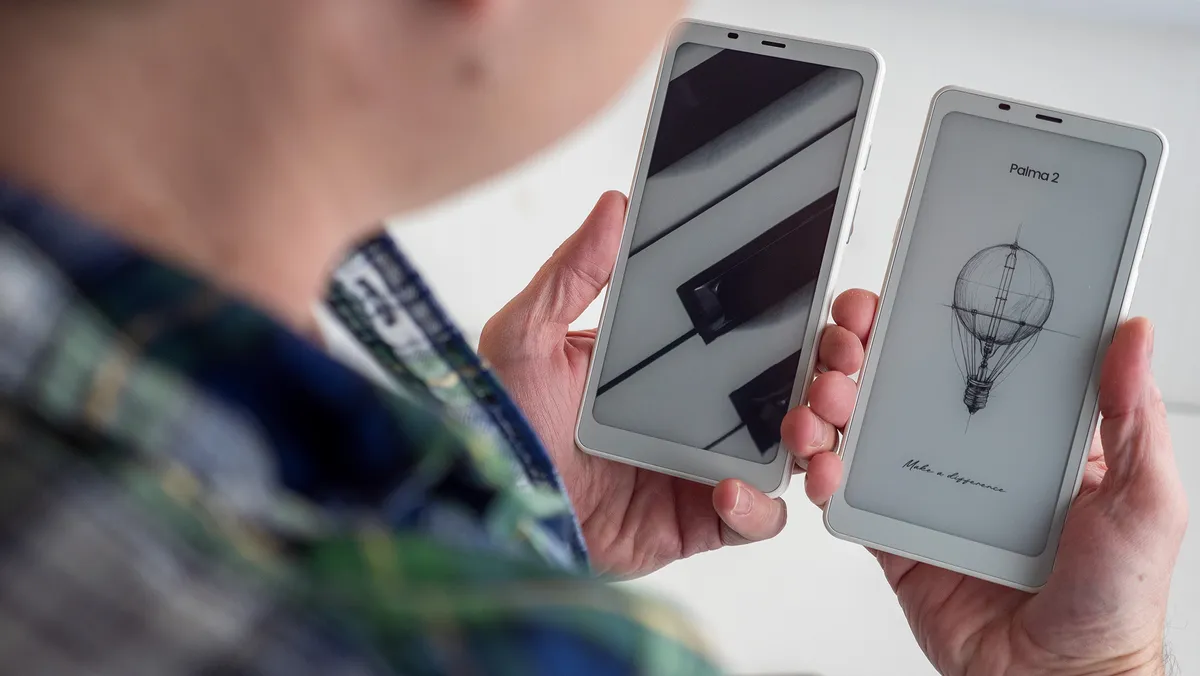
We're big fans of Boox's lineup of E Ink tablets, especially considering that many of them now ship with Android. The Boox Palma 2 is no exception, meaning that you don't have to choose where to buy (or rent) your next book from. Whether your e-library is housed within the confines of Amazon's Kindle ecosystem or Google Play Books, just download the appropriate app and get to reading!
The Boox Palma 2 is very similar to the Onyx Boox Palma that came before it, but it gets some critical upgrades. This includes a fingerprint reader, Android 13, and a faster processor. The rest of the specs and features are more or less the same, right down to the design. It's priced slightly higher but not too much to make it a deal breaker.
Something else to keep in mind is that while it does look and act like an E-Ink smartphone, you won't be able to replace your smartphone with the Boox Palma 2. That's because Boox didn't include a SIM card tray. Frankly, it's not a surprising omission.
Compare specs
| Header Cell - Column 0 | Samsung Galaxy Tab S10 Lite |
Samsung Galaxy Tab A11 |
Amazon Fire HD 8 (2024) |
Amazon Fire HD 10 Kids (2023) |
AGM Pad P2 Active |
Xiaomi Redmi Pad Pro |
TCL NXTPAPER 11 Gen 2 |
Lenovo Idea Tab |
Onyx Boox Palma 2 |
|---|---|---|---|---|---|---|---|---|---|
Display |
10.9-inch TFT LCD; 2112 x 1320; 90Hz |
8.7-inch TFT LCD; 1340 x 800 |
8-inch LCD; 1280 x 800 |
10.1-inch LCD; 1920 x 1200 |
11-inch,1920x1200 90Hz LCD |
12.1-inch LCD, 2560x1600 |
10.95-inch (1920 x 1200) NXTPAPER 4.0 |
11-inch LCD; 2560 x 1600 |
6.13-inch, E Ink Carta 1200, 824 x 1648 |
Processor |
Samsung Exynos 1380 |
MediaTek Helio G99 |
Hexa-core 2.0 GHz |
Octa-core 2.0 GHz |
MediaTek Helio G99 |
Qualcomm Snapdragon 7s Gen 2 |
MediaTek MT8786 |
Mediatek Dimensity 6300 |
Upgraded octa-core CPU |
Memory |
6GB / 8GB RAM; 128GB / 256GB Storage w/ microSD card slot |
4GB / 6GB / 8GB RAM; 32GB / 64GB / 128GB Storage w/ microSD card slot |
3GB/ 4GB RAM; 32GB / 64GB Storage w/ microSD card slot |
3GB RAM; 32GB Storage w/ microSD card slot |
8GB RAM; 256GB Storage w/ microSD card slot |
6GB, 8GB RAM; 128GB, 256GB Storage w/ microSD card slot |
8GB RAM; 128GB Storage w/ microSD card slot |
4GB / 8GB RAM; 128GB Storage w/ microSD card slot |
6GB / 128GB |
Cameras |
5MP front; 8MP rear |
5MP front; 8MP rear |
2MP front; 5MP rear |
2MP front; 5MP rear |
8MP front; 50MP rear |
8MP front; 8MP rear |
5MP front; 8MP rear |
5MP front; 8MP rear |
16MP |
Battery |
8,000mAh |
5,100mAh |
Up to 13 hours |
Up to 13 hours |
8,000mAh |
10,000mAh |
Up to 19 hours |
7,040mAh |
3,950mAh |
Dimensions |
254.3 x 165.8 x 6.6mm |
211.0 x 124.7 x 8.0mm |
201.6 x 137.16 x 9.3mm |
266.88 x 207.98 x 26.85 mm |
258.83 x 169.93 x 7.87mm |
280 x 181.85 x 7.52mm |
253.6 x 165.4 x 7.3mm |
166.15 x 254.59 x 6.99mm |
159 x 80 x 8mm |
Weight |
1.16lb |
0.73lb |
0.74 lb |
1.4 lb |
1.31lb |
1.2lb |
1.10lb |
1.06lb |
170g |
Price |
Gray, Silver, Coral Red |
Gray, Silver |
Gray, Emrald, Hibiscus |
Blue, Pink, Disney princess, Disney Mickey Mouse |
Black |
Graphite Gray, Mint Green, Ocean Blue |
Gray |
Luna Grey |
Black, White |
Honorable mentions
There are so many choices for cheap Android tablets under $300 that it's enough to make anyone's head spin. Although the options detailed above are our "top picks," the reality is that you might still be looking for something a bit different. Thankfully, there are plenty of tablets to choose from, so here's an honorable mention that is worth consideration.

Cheap and portable
We never would have guessed that Walmart's own lineup of tablets would be compelling, yet here we are. The onn. 8-inch tablet was refreshed in 2024, and it is powered by a MediaTek Helio G80. More importantly, it can be had for less than $80. Not to mention that it's rated to last for up to 15 hours on a full charge, which is quite impressive, even for an 8-inch tablet.
How to choose
What's the best cheap Android tablet overall?
Why you can trust Android Central Our expert reviewers spend hours testing and comparing products and services so you can choose the best for you. Find out more about how we test.
Finding the best Android tablet in the "budget" market is a bit odd. This is partly because our smartphones have come close to the size of a smaller tablet, and a budget-minded tablet can't hold a cup of tea to flagship smartphones.
With a slight discrepancy between the two, it becomes really tough for users to spring for another device when they can already do everything the tablet can and, in most cases, in a better capacity. Plus, the market is eclipsed in part by Apple's iPad, which is ahead of the curve in terms of tablet technology.
While a few things could be improved, the Samsung Galaxy Tab S10 Lite is our favorite "cheap" Android tablet. You get a great design, a beautiful display, Samsung DeX, and seven years of OS and security updates, along with S Pen support.
What to look for in a cheap Android tablet
When it comes to buying a new device, whether it's the best Android phones, the best Chromebooks, or anything in between, there are a few things to keep in mind. The first of which is identifying a reason for buying the tablet.
Do you want a cheap Android tablet that comes with a great screen for media consumption? Maybe you want something that your kids can enjoy with plenty of parental control. Or maybe you need a tablet that pulls double-duty and is great for answering emails but can also transform into a portable Xbox Game Pass machine.
Price-to-performance is always a key factor in any decision, meaning that just because a tablet is more expensive, doesn't necessarily mean that it's the best out there. That more expensive tablet could have an incredible display with all of the bells and whistles from a feature-set perspective. But if the internals don't match with the externals, then you might end up being disappointed.
With this roundup, we took a look at every Android tablet priced under $300 and made our decisions based on what we would look for. There are a lot of tablets that come in under the price threshold, but not all of them are really worthy of consideration.
How we test
☑️ One of the oldest and most trusted Android sites on the web
☑️ Over 15 years of product testing
☑️ Thousands of products reviewed and tested since 2007
☑️ Over 50 phones and tablets tested every year by our team
In addition to what we outlined above, testing these devices means putting them through a variety of scenarios to determine metrics and rankings. This includes performing battery tests with specific variables that can be easily replicated when a new device comes across our desk.
This also includes attempting the same performance tests that are performed on the best Android tablets. After our initial testing is complete, then it's on to "real world usage," which includes diving into the software to see what's possible. And if a tablet is advertised as having a unique or specialized feature, we're sure to put our focus there in order to see whether the claims made are true.
As is the case with every device, we wouldn't be able to provide a comprehensive review without actually using it. Which means that we put our current devices to the side, replacing them with whatever new and shiny tablet lands on our doorstep. From there, we collect all of the test results and our personal experience in order to make a final determination before issuing a review score.

