
Most modern smart TVs sold today tend to have Google TV built-in but the experience is not always great. This is because TV manufacturers tend to have their own custom interface along with Google TV which can make usage feel laggy and unintuitive at times. This is why the best streaming devices still have a place in your home entertainment setup as their sole purpose is to stream content.
With so many fresh and affordable streaming devices to choose from, we're breaking down the options to help you find the one that will fit your needs best. Our best overall pick is the Google TV Streamer (4K) as it replaces the Chromecast with Google TV (4K) dongle. Whether you need something more affordable and versatile or something specifically for your preferred ecosystem of tech, below are all the very best streaming devices in the market today.
At a glance

Best overall
The Google TV Streamer (4K) has a sleek new design that sits just below your TV, and it comes in two colors to blend in with your home decor. You get plenty of ports, performance is good, and the new remote has a handy "Find My" feature.

Best 4K
Enjoy Alexa support and 4K streaming capabilities with the mid-range Amazon Fire TV Stick 4K Max (2023). The stick form factor reduces clutter, too!

Best for Apple ecosystem
Apple users will gravitate toward the Apple TV 4K (2022) by default. It's pricey, but it's what you'll have to pay for the ecosystem.

Best upgrade
NVIDIA's Shield TV uses AI to upscale content, making this the best upgrade pick for streaming. But be mindful of the premium price tag.

Best versatile
Roku Ultra is a versatile device that supports it all. You get both Google Assistant and Alexa, as well as 4K HDR with Dolby Vision and Dolby Atmos.

Best bar
The Roku Streambar SE combines a conventional sound bar with a streaming device. This cheaper version of the original can stream 4K HDR video and sounds fantastic.
Load the next product ↓

Best cheap
Amazon's Fire TV Stick 4K Select is a cheap and cheerful streaming stick that often goes on sale for less than $20. Yet, you get Alexa+ support and 4K HDR streaming.
Best overall

The Google TV Streamer (4K) is Google's flagship streaming box with improved performance, way more storage, and a more functional remote than the Chromecast dongle before it. The device now sits on your entertainment console rather than dangling from your TV's HDMI port, and it's inconspicous enough to blend in with your home decor. It also comes in two colors, which is a first.
The specifications and ports are all there. The Google TV Streamer can output up to 4K 60fps and supports all the major HDR formats like Dolby Vision, HDR10+, and HLG. The same goes for audio formats which include Dolby Atmos. The box supports dual-band Wi-Fi 5, has 4GB of RAM, and 32GB of storage for apps. What's new is the support for Matter and Thread devices, making it kind of futureproof. One thing that we didn't quite like is the fact that at $99, you don't have an HDMI cable in the box.
Best 4K

Most of our top streaming picks cater to Android or Apple users or are universally compatible but don't specialize in any one tech ecosystem or voice assistant. But many people consider Alexa to be the best voice assistant available today, and if you want a streaming dongle with built-in Alexa commands, then your best choice is, of course, a Fire TV Stick.
Of the Amazon Fire TV family, we selected the Fire TV Stick 4K Max (2023) as the device that most shoppers should choose, as a close rival to the Chromecast with Google TV in specs and features. Both streaming dongles have identical support for 4K, HDR10+, Dolby Vision, and Dolby Atmos. Each lets you contact their respective voice assistants with the touch of a button. We actually like the Alexa remote more because it has dedicated rewind and fast-forward buttons. Our Fire TV 4K Max (2023) review did find the ads to be a bit too much using this device however.
However, we didn't hesitate to put Chromecast with Google TV above the Fire TV Stick 4K on our best streaming device list. For one thing, the Fire TV Stick 4K Max is powered via micro-USB, while Chromecast with Google TV uses USB-C; with the latter, you can connect your Chromecast to a USB-C hub. The Fire TV Stick 4K Max also supports Wi-Fi 6, so your videos can stream in higher quality with less time wasted on buffering.
One interesting addition to the 2023 model is Ambient Mode, which allows you to choose from thousands of pieces of museum-quality art and photography to display on screen when you aren't watching. This effectively turns your TV into a painting or framed photo on the wall.
Nevertheless, if you prefer Alexa and Fire OS 8, the Fire TV Stick 4K Max (2023) gets you an excellent level of quality in a tiny, bargain-priced streaming device.
Best for Apple ecosystem

For regular Apple users, the choice of the best streaming device is a simple one. Apple TV 4K (2022) is built to accommodate your iOS devices with AirPlay 2, serve as a HomeKit hub for your smart home cams, plays or displays your iTunes purchases or iCloud photos, allows you to play Apple Arcade games, do Apple Fitness+ workouts, and puts Apple TV+ shows front and center. With the latest OS update, you can even continue or initiate a FaceTime call on the big screen. For everyone else, however, the Apple TV 4K is a rather expensive streaming box that doesn't cater to other tech ecosystems.
That said, Apple TV 4K doesn't just coast on its brand name, cramming several useful features into its premium streaming device to try and justify the high cost. For instance, one version has a gigabit ethernet port for consistent internet speeds while streaming Dolby Vision and Atmos content with support for HDR10+ as well. This 2022 version has a powerful A15 Bionic chip that makes menus and searches move faster than the norm.
It also has a Picture-in-Picture mode that lets you use two different apps at once on your TV; and it supports several live TV services, including Hulu with Live TV, YouTube TV, AT&T TV, Sling TV, and Charter Spectrum. The improved Siri remote has a touch-enabled click pad for ease of use and precise control. You can also use your iPhone to color calibrate the screen.
As for its negatives, they're fairly predictable. The price is still a bit steep, as you get many of the same specs that you'll find on the Google TV Streamer at a quarter of the cost. You must also rely on Siri for voice commands, instead of Alexa or Google Assistant.
Best upgrade
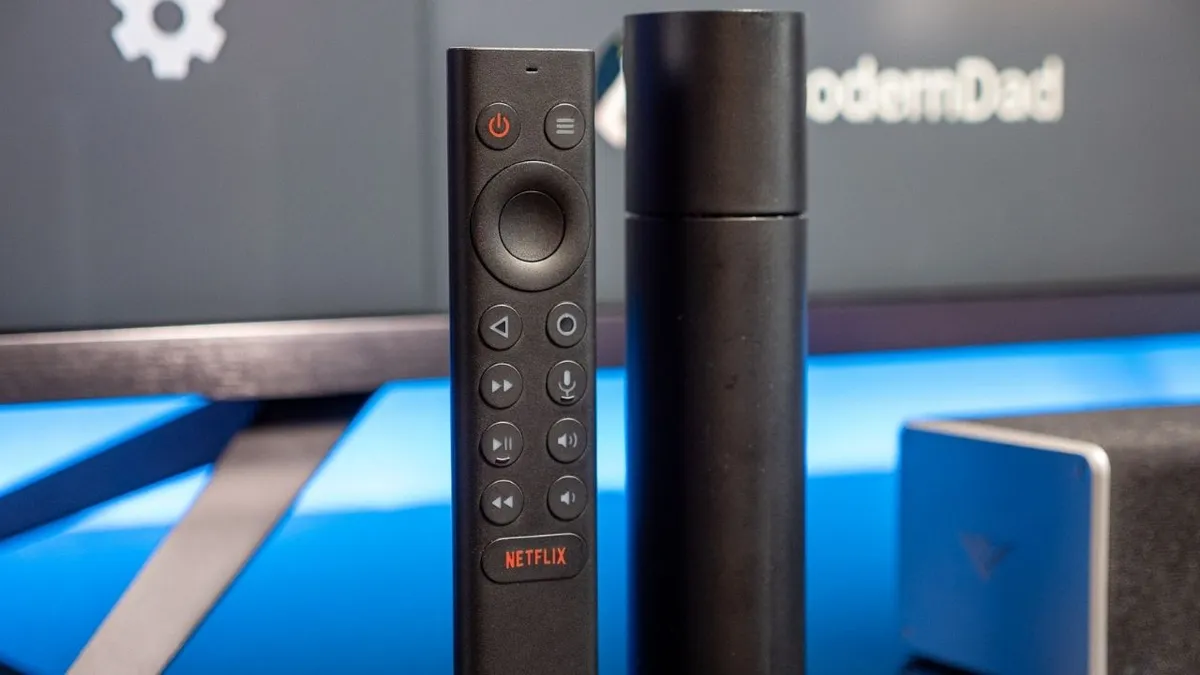
Before Chromecast with Google TV hit the streaming scene, there were other companies offering for Android TV streaming dongles, and NVIDIA Shield TV was at the top of our best Android TV boxes list. Now, new Chromecasts have the retooled Google TV streaming library, while Android TV devices lack the new Knowledge Graph of personalized recommendations.
So why have we kept the Shield TV on our current list of best streaming devices? That's thanks to its still-impressive specs highlighted by its unique upscaling tech. We break down NVIDIA's AI-enhanced upscaling in greater detail here, but the gist is that NVIDIA can take 720p or 1080p content and enhance it in real-time to 4K at 30 FPS. All 4K TVs upscale non-4K content by default to fill in the missing pixels, but this process does this intelligently, so that it looks to be shot natively in 4K.
Upscaling aside, Shield TV has Google Assistant built into the remote, plays content up to Dolby Vision and Atmos, has two Mimo Wi-Fi antennas or Gigabit Ethernet for fast streaming, and lets you expand its storage via the microSD card slot. Gamers can also take advantage of GeForce Now, the game streaming service that lets you access your Steam library of games wirelessly on your television.
Best versatile
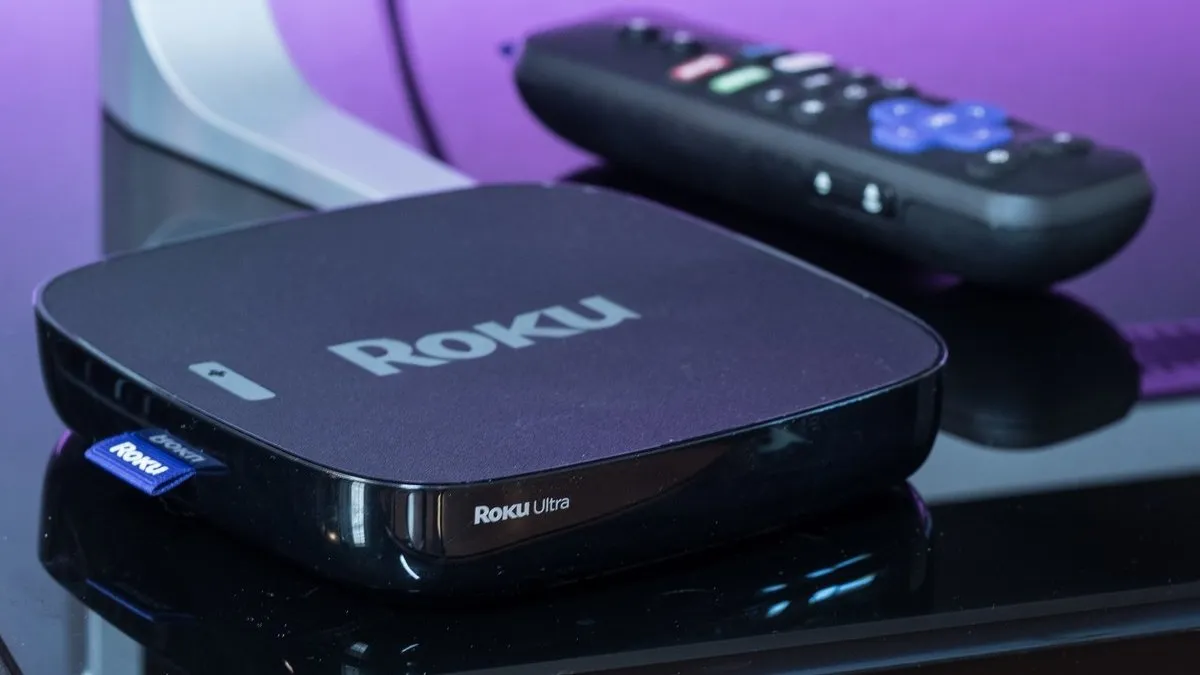
Roku is one of the most popular streaming brands in the world because of its near-universal compatibility with various apps and tech companies. The Roku Ultra hosts all of the major streaming platforms, has Bluetooth 5.0 support to connect with any phone, and works with both your Alexa or Google Assistant speakers. Moreover, it supports Apple AirPlay 2 and HomeKit, making it a good future-proof choice for Apple users.
It's also true that the Roku Ultra is somewhat pricey, considering the Roku Streaming Stick+ also offers 4K HDR video at half the price, and neither has an embedded voice assistant. Yet we still consider the Roku Ultra the best Roku device to buy. The cheaper Stick+ model lacks the Ultra's USB port for expandable storage, 100 Mbps ethernet port, Bluetooth connectivity, and vastly improved remote control.
The Streaming Stick+ comes with a basic remote featuring TV controls and a button to activate your smart speaker's listening mode. But the Roku Ultra remote has a built-in headphone jack and ships with JBL headphones to listen to your TV audio privately, as well as two customizable shortcut buttons that let you jump immediately to your favorite streaming platforms. Plus, if you ever lose the remote, the Roku Ultra has a button that activates a noisemaker on the remote to help you find it.
If you want a streaming device that doesn't bother with TV and film recommendations and displays a simple interface of your favorite apps (not to mention you get access to tons of free content via Roku Channels), then you should strongly consider the Roku Ultra.
Best bar

Sticks, dongles, TVs — all the typical names for streaming devices fixate on how small they are or the video content they can stream. Yet certain streaming devices go far beyond that, bundling in other useful features like smart speaker tech. Of these hybrid devices, our favorite is undoubtedly the Roku Streambar SE. The standard Streambar seems to have been phased out in favor of the cheaper SE model.
Along with all the streaming capabilities of a Roku Streaming Stick+, the Roku Streambar SE is also a fully functional 2.0-channel sound bar. It has two 1.9" full-range speakers which deliver decent volume and clarity.
While not as advanced as the Roku Ultra — the Streambar SE can stream 4K HDR10 and 10+, but not Dolby Vision or Dolby Atmos. With Bluetooth 5.0 support for your music streaming, an ethernet port for consistent internet, and continued support for Alexa and Google Assistant, the Streambar SE is more than worthy of sitting under your living room television.
Best cheap

The new budget Amazon Fire TV Stick 4K Select is a brilliant addition to the Fire TV Stick lineup as it costs just $5 more than the basic HD model but offers way more features. As the name implies, you can stream 4K HDR videos but Dolby Vision support is restricted to the higher models. Even if you plan on using this with an old HDTV today, it'll still be useful once you do upgrade to a 4K TV in the future.
The Fire TV Stick 4K Select ships with the Alexa Voice Remote, has 8GB of RAM, and supports Wi-Fi 5 connectivity. This is model also works with Alexa+ which means you'll be able to take advantage of the more natural language search features. What makes this model particularly great is that it retails for just $40 and more often than not, you can find it on sale for under $20.
Make your TV smarter without compromise
Why you can trust Android Central Our expert reviewers spend hours testing and comparing products and services so you can choose the best for you. Find out more about how we test.
If this guide shows anything, it's that the further a streaming device's price tag rises above $50, the harder it becomes to justify the amount. Google, Amazon, and Roku sell excellent devices at that threshold or lower, and they often incorporate tech like Dolby Vision that was once reserved for "pro" devices, at no extra cost.
Of these supposedly budget streaming options, the Google TV Streamer should be one of your first considerations. It has an excellent user interface thanks to Google TV and it's one of the more affordable streaming devices available. We also love that Google Assistant or Gemini is available right from the remote.

