

Android Central Labs is a weekly column devoted to deep dives, experiments, and a focused look into the tech you use. It covers phones, tablets, and everything in between.
It's hard to believe that a smartphone display can get any better than the current crop of phones, but the OnePlus 15 promises to blow your mind once again with a 165Hz refresh rate, new eye-friendly features, and an OLED panel that's designed to deliver maximum wow factor.
OnePlus is also laser-focused on speed and gaming performance, delivering a display that's more in line with "gaming phone quality" than one you might find on a typical smartphone. That includes not just the higher refresh rate, but also a dedicated touch response chip and a new fluid frame generation feature for supported titles, such as Call of Duty Mobile.
OnePlus isn't pushing this display as ultrabright despite some obvious improvements in brightness, and the company isn't following Samsung in using an anti-glare layer on the screen, either. How does it all stack up? Let's take a look, and don't forget to check out our full OnePlus 15 review to see how the rest of the phone stands out.

Enjoy our content? Make sure to set Android Central as a preferred source in Google Search, and find out why you should so that you can stay up-to-date on the latest news, reviews, features, and more.
Eye comfort and brightness
The OnePlus 15 boasts the latest TÜV Rheinland Intelligent Eye Care certification, including a flicker-free and low blue light-emitting display. Brightness and dimming methodology are paramount to eye comfort, especially when trying to use a device in a dimly lit environment. Many phones, such as the Pixel 10 Pro, use low-frequency PWM dimming, which can make them an uncomfortable choice for some people.
The OnePlus 15 is supremely comfortable thanks to OnePlus's use of DC dimming at medium to high brightness and 2160Hz PWM dimming at low brightness. Not only that, but the modulation rate of the display is impressively low, coming in at roughly 1/3 the rate of the OnePlus 13.
On the downside, OnePlus doesn't offer dimming options on this display, so what you see is what you get.

OLEDs emit their own light, so, as a result, each time the image refreshes, a dip in brightness occurs. This is known as modulation. Phones like the Galaxy S25 Ultra and Pixel 10 don't attempt to control this brightness dip at all, giving them a very harsh strobing effect at 100% brightness reduction each cycle.
The OnePlus 15 efficiently manages this brightness dip to a maximum of 35%, meaning that the brightness dip is significantly less harsh and should be comfortable for most people.

OnePlus shipped its first-ever "reduce white point" accessibility feature with the Android 16-based Oxygen OS 16 update, which reduces the peak brightness of the display for sensitive people. I've found that leaving it at 80% white point reduction makes this the most comfortable flagship display I've used to date.
OnePlus also shipped its first-ever Motion Cues feature in Oxygen OS 16, adding moving dots to the sides of the display for people who get motion sick. It's something we've seen Honor adopt on its phones in the past year, and it's a great choice for motion sickness-prone individuals.

Folks who prefer the highest peak brightness will be happy with this display. It's slightly brighter than the Galaxy S25 Ultra's display without resorting to nasty flickering PWM dimming like Samsung uses, but it's not quite as bright as the Pixel 10 Pro or Pixel 10 Pro XL's displays.
All of these displays are plenty bright for outdoor viewing, although OnePlus isn't employing an anti-glare filter like Samsung used on the S24 Ultra and S25 Ultra. Still, now that the OnePlus 15 uses a fully flat display, it should be easy enough to find a good tempered glass screen protector with an anti-glare layer applied.
And thanks to the high-frequency PWM dimming rate, viewing this one in a totally dark room won't tire your eyes out. It also gets down to 1 nit by default or as low as 0.5 nits when "reduce white point" is enabled. That's the darkest I've ever seen a smartphone display get.

Lastly, the OnePlus 15's OLED display doesn't show any signs of mura, unlike the Galaxy S25 Ultra's display. Mura is the measurement of how uniformly pixels are lit, something that's particularly important on an OLED screen.
As you can see from the above picture, a uniform 50% grey image produces perfectly uniform pixel illumination when viewed through a macro lens. Displays with poor mura can look grainy, especially at low brightness, and have been a complaint among Galaxy S24 and S25 owners over the years.
Gaming, refresh rate, and resolution
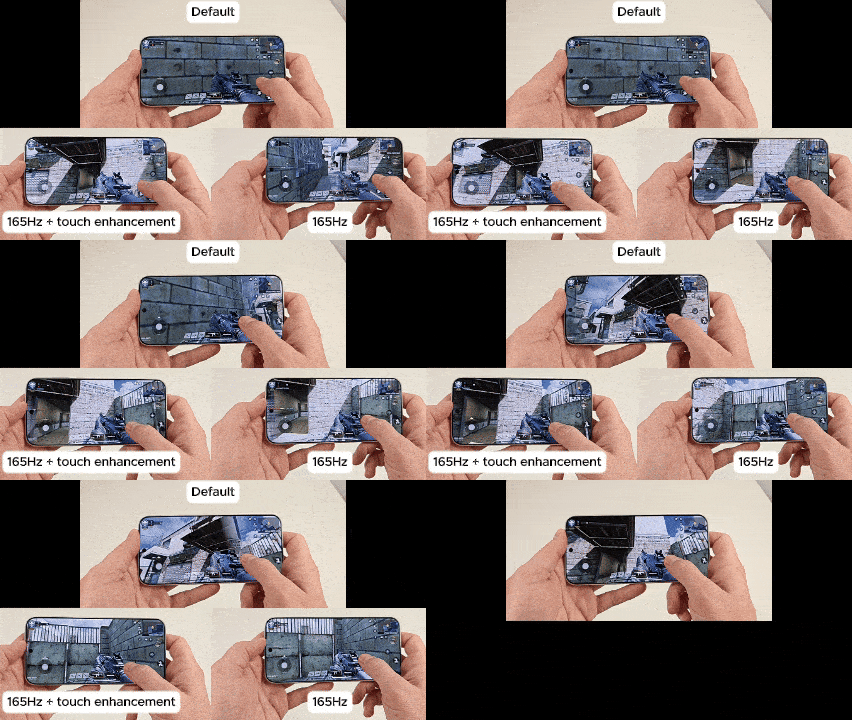
Some concerns were raised over OnePlus's decision to choose a higher refresh rate display, as it sacrificed some screen resolution. But even at a reduced resolution of 2772 x 1272 pixels — compared to 3168 x 1440 on the OnePlus 13 — it still pushes a pixel density of 450 PPI.
That's well more than "retina" resolution, and there's no chance anyone will look at this and see anything less than a gorgeous, crystal-clear high-res screen.
To enable 165Hz, you'll need to launch a supported title, swipe the OnePlus game launcher out from the sidebar, and check all the boxes to achieve maximum smoothness. Aside from refresh rate, OnePlus also debuted a brand new dedicated touch response chip that upgrades the response rate to 3200Hz.
- Call of Duty
- Clash of Clans
- Brawl Stars
- Real Racing 3
- Standoff 2
- Blood Strike-FPS
- Battlegrounds Mobile India
- PUBG
With all these settings enabled, I could clearly tell a difference in the fluidity and responsiveness of supported touchscreen games. I'm not someone who typically plays something like Call of Duty Mobile on a touchscreen — I'd rather use a great Android controller like the GameSir Galileo G8 — but this was an impressive upgrade for people who play on touchscreen only.
Otherwise, this display uses a "typical" LTPO refresh rate schema of 1-120Hz depending on what's on screen. There is no way to force 165Hz all the time as some Motorola phones support.
Color accuracy and depth

The OnePlus 15 utilizes a true 10-bit OLED screen, resulting in natural-looking colors and proper HDR brightness without resorting to nasty tricks like faking color depth with dithering.
Folks wanting a more vibrant or sharper experience can use the image sharpener and video color boost features found in display options. OnePlus also allows users to adjust the color temperature of the phone's display using various adaptive tone and eye care solutions.
You can also choose from three preset color space modes: Standard (default), Natural, and Vivid. All three options allow for very specific tweaking via a color wheel, which is substantially more granular than other phones offer.
Verdict

The OnePlus 15 wins handily in most measurable metrics, earning it the award for best flagship display in a phone I've measured this year. Samsung's Galaxy S25 Ultra still beats it in outdoor visibility due to that phone's anti-glare layer on the screen, but the OnePlus 15 is still plenty easy to see thanks to a peak 2,000 nit brightness.
Aside from this one use case — which can be solved with an anti-glare tempered glass protector — the OnePlus 15's display is as good as you'll find anywhere. It's also the most comfortable flagship phone display I've used to date, and it achieves this metric without sacrificing image quality, resolution, smoothness, or other desirable traits. All in all, this is the metric for how to make a great display.

Want a beautiful display that won't hurt your eyes? The OnePlus 15 has it all, from excellent peak brightness to an incredible 0.5 nit lowlight setting, and a bevy of eye care features that ensures even sensitive users can enjoy it pain-free.
FAQ
How bright is the OnePlus 15 display?
The OnePlus 15 display gets as bright as 1,800 nits in high-brightness mode. OnePlus has not disclosed the HDR brightness levels but our tests show it to be comparable to the Galaxy S25 Ultra.
How fast is the OnePlus 15 refresh rate?
The OnePlus 15 features a display refresh rate that ranges from 1Hz to 165Hz. In normal use, this range will lower to a maximum of 120Hz. When gaming, the OnePlus 15 is capable of maintaining 120 FPS gameplay with minimal to no frame drops and supports 165 FPS for select gaming IPs.
Which games support 165Hz mode on the OnePlus 15 display?
The games that support the 165Hz refresh rate on the OnePlus 15 display include: Call of Duty, Clash of Clans, Brawl Stars, Real Racing 3, Standoff 2, Blood Strike-FPS, Battlegrounds Mobile India, and PUBG.
What is the PWM rate for the OnePlus 15 display?
The display supports 2160Hz PWM at low brightness levels, making it more comfortable than competing phones from Google, Samsung, and Apple.

