
What you need to know
- Google Drive finally dumps its outdated file viewer, replacing it with a cleaner, faster, and far more useful interface.
- PDF viewing gets a massive upgrade with a sidebar table of contents and page thumbnails.
- The new video transcript search lets you jump straight to any spoken keyword.
Enjoy our content? Make sure to set Android Central as a preferred source in Google Search, and find out why you should so that you can stay up-to-date on the latest news, reviews, features, and more.
For a long time, opening a file in Google Drive felt outdated, especially when you were just trying to read a PDF in your browser. Now, that old experience is finally gone.
Google Drive on the web is getting rid of its old, clunky viewer. What used to be a basic, sometimes frustrating way to open PDFs, images, and videos is being replaced with a cleaner, more useful workspace.
This update fixes common complaints about how you move around, organize, and use the Drive viewer. If you spend a lot of time jumping between documents or reviewing media straight from your browser, you’ll feel the difference immediately.
PDFs in Drive finally make sense
The biggest improvement is for PDFs, which have always been a weak spot in Drive. The new viewer now shows a table of contents on the left if the file has one, along with thumbnail previews for every page. You no longer have to scroll endlessly through a hundred-page document hoping to land on the right paragraph.
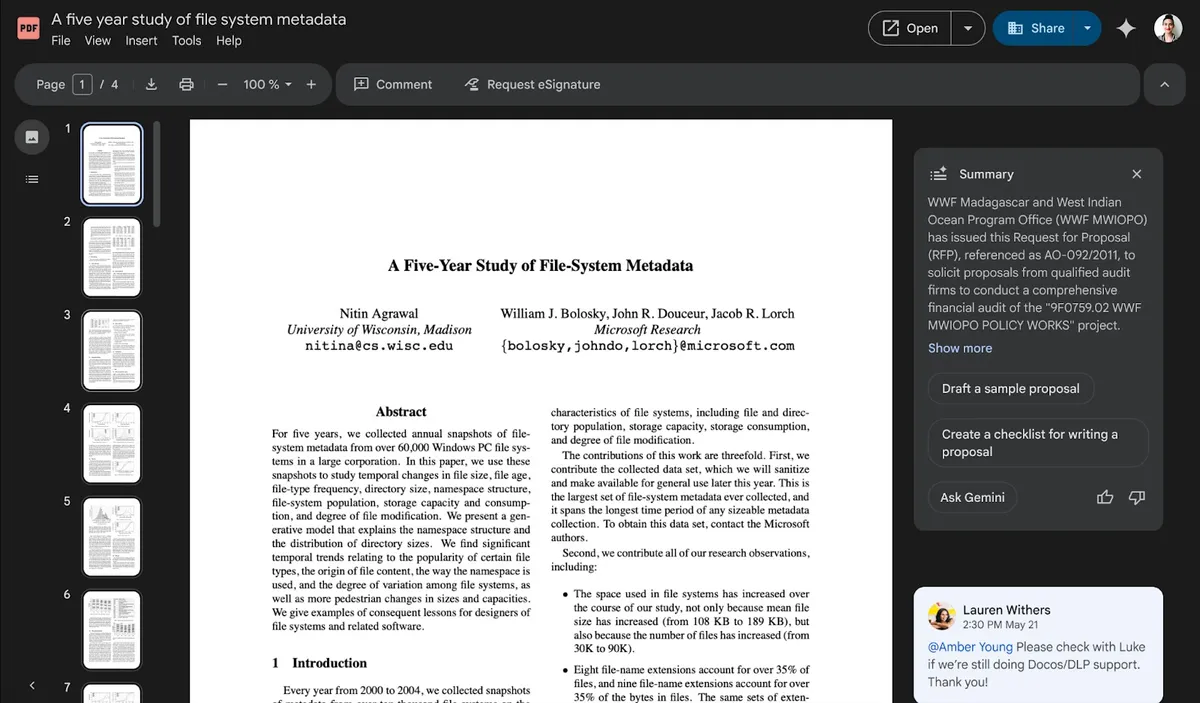
This new interface pairs nicely with Drive’s Gemini-powered audio summaries. You can generate and listen to a quick overview right from the side panel, or jump into the “Audio overviews” folder to replay anything you’ve saved.
Google didn’t stop at PDFs, though. Video files get a surprisingly powerful upgrade with a transcript search tool built right into the viewer. Instead of scrubbing back and forth trying to find the exact moment someone mentions a keyword, you can type the word directly into the transcript and jump straight to that point in the video.
This feature saves you time right away, especially if you work with long recordings or meeting videos.
All of this sits atop a refreshed interface that looks cleaner and behaves more predictably. The toolbar has been redesigned, the file menu is more intuitive, and the overall layout feels less cramped.
The rollout is already underway for users on Google’s Rapid Release track, while Scheduled Release domains will begin seeing the new viewer starting December 11, 2025. The update is available for both personal and Workspace users.

