
We've heard all about how Aluminum OS is Google's desktop Android project, and it could replace ChromeOS. Now, we have an idea of which devices will actually run Aluminum OS. During today's The Android Show: I/O Edition, Google revealed a new lineup of Android-powered laptops called Googlebooks. They'll be made by five partners to start, namely Acer, ASUS, Dell, HP and Lenovo. And while we don't know exactly what the OS powering Googlebooks will be named, we do know it's build on the Android technology stack.
It isn't just a larger version of the Android that powers your phone — even if it looks a bit similar to Android 16's desktop mode and the Chrome OS user interface. Instead, Google wants to transform the Android operating system into an "intelligent system" with AI at the core. It also views Android as being the singular software experience across phones, watches, tablets, laptops, and even cars. Those are lofty goals, and we can't say whether Aluminum OS will achieve them. If the project succeeds, Googlebooks will be the start.
They'll run the Gemini Intelligence software suite in addition to an Android-based OS, which adds new features, including a fresh take on a user interface element I didn't think needed changing — the cursor. It has gone virtually unchanged for decades, but Google wants to revamp it with Magic Pointer. After hearing about, it has me wondering whether the cursor is already perfect, or if we've been settling for it while something better exists.
Magic Pointer suggests features you didn't know you needed
The desktop cursor is arguably the most important part of a computer operating system — it's often the reason we turn to traditional laptops and desktops instead of using our mobile devices. The precision of a desktop pointer, paired with its ability to switch into a grabber and text selector based on the situation, helps streamline workflows and allow you to do things you couldn't with a finger or stylus. So, does it need changing?
I've been unsure of that, because Google's take on the desktop cursor isn't the first attempt at reimagining the tool we've seen over the last few years. Apple tried something new with iPadOS by adding a circular and contextual cursor that morphs into UI elements on your iPad. It's a way of bringing thoughtful and precise control to a touch-first operating system. For me, it hasn't quite landed, because it isn't as precise as a traditional cursor or as convenient as using my finger.
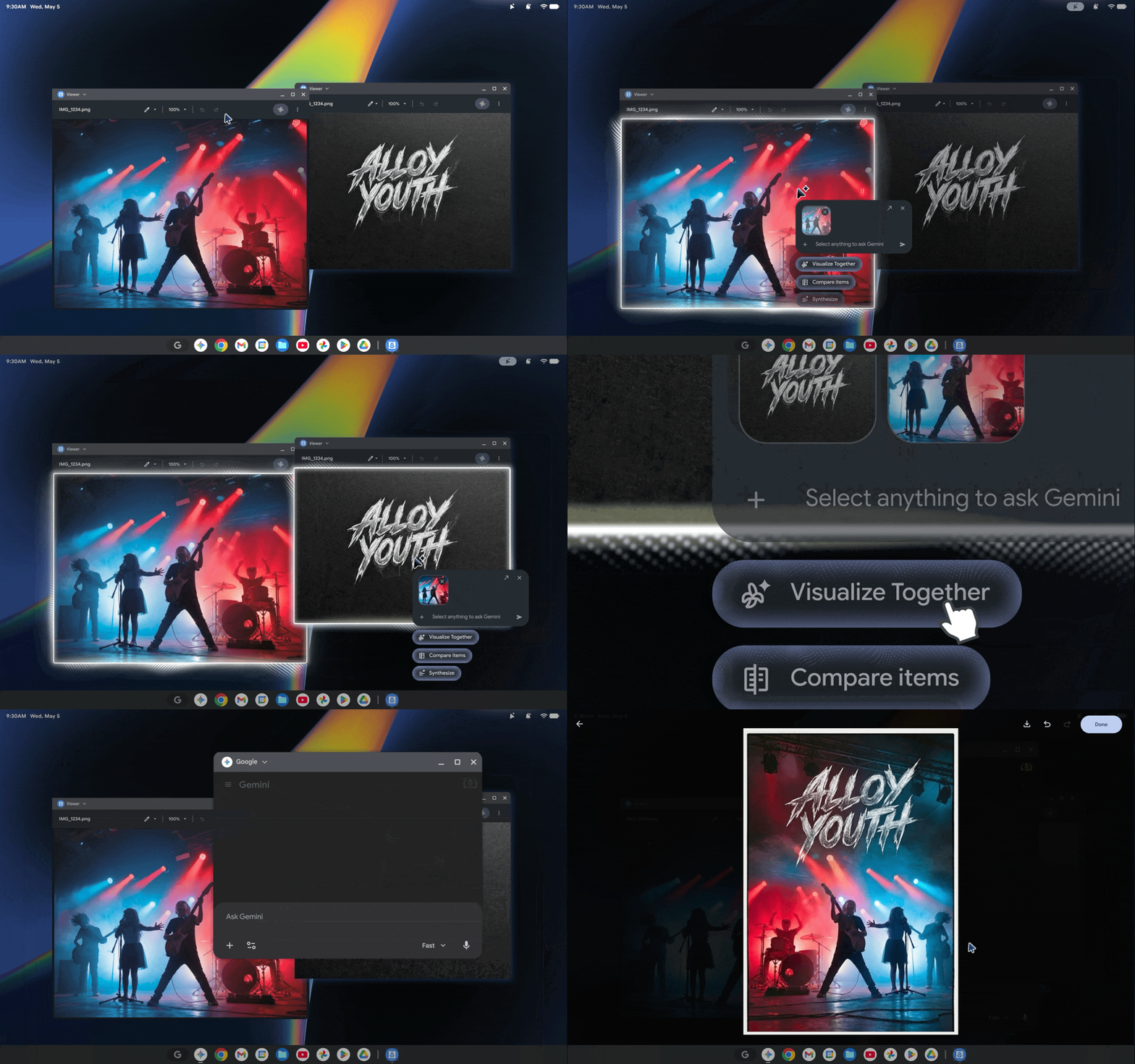
Google's Magic Pointer for Googlebooks is similar in that it's a desktop cursor designed to transform situationally as you use your operating system. However, the implementation is much different than iPadOS — the transformative nature of the cursor is the only thing in common. Magic Pointer is based on Gemini, and runs on-device to provide immediate suggestions based on what you're doing. It will suggest Gemini-powered actions you can take with content on your screen in real time.
For example, you could hover your cursor over a date, and Magic Pointer could suggest creating a meeting or calendar invite. Use your cursor to select a pair of images, and Gemini could merge them with Nano Banana. The Magic Pointer suggestions are happening quickly using on-device processing, with the final actions (like generating an image) offloaded to the cloud for processing.
It's all part of Google's effort to make AI a central part of its operating systems, rather than a side app you use when you think of it.
It's just one Gemini Intelligence tool coming to Googlebooks

I'm intrigued by the Magic Pointer, and I think it could help Googlebooks stand out. Google-powered laptops, like Chromebooks, have always been about using cloud-based features to limit the amount of processing that's actually done on your device. This is how Chromebooks are able to undercut the competition in price, and provide useful tools with lower-end hardware. Googlebooks are set to use a mix of on-device and cloud-based AI processing to deliver Gemini Intelligence features — right in your cursor.
The simplicity of Magic Pointer might be the most important part. It's harder than you might think to integrate AI features into your workflow. You test a tool like Nano Banana to try it out, but don't remember to use it when trying to visualize a couch in your space. With Magic Pointer, there's an active reminder of the Gemini Intelligence tools available on your Googlebook. Some people might not like how much AI is built into a feature as basic as the desktop cursor, but others will love it.

