

In his weekly column, Android Central Senior Content Producer Nick Sutrich delves into all things VR, from new hardware to new games, upcoming technologies, and so much more.
I've spent the past five weeks with Xreal ROG R1 glasses, a cutting-edge pair developed jointly by Xreal and Asus. As with all ROG-branded products, these glasses (also known as a wearable monitor) have a very specific design language, a near-ridiculous number of features, and a price tag that puts them squarely in "enthusiast" territory.
They also pose a rather interesting alternative to traditional monitors that I'm not sure smart glasses are quite ready to bridge yet: replacing a gaming monitor with a virtual one. That's not to say the picture quality, resolution, or even features aren't there — it's top-notch in these categories among any comparable pair, after all. Rather, I'm just not sure how many people are ready to make smart glasses a proper replacement for monitors.
But if you're seriously considering clearing off your desk or you just want a robust on-the-go virtual monitor solution, Xreal ROG R1 is the best pair of smart display glasses money can buy. It's the ideal combination of the Xreal One Pro's ease and the robust feature set of a ROG device. Here's everything you need to know before buying.
What is Xreal ROG R1?
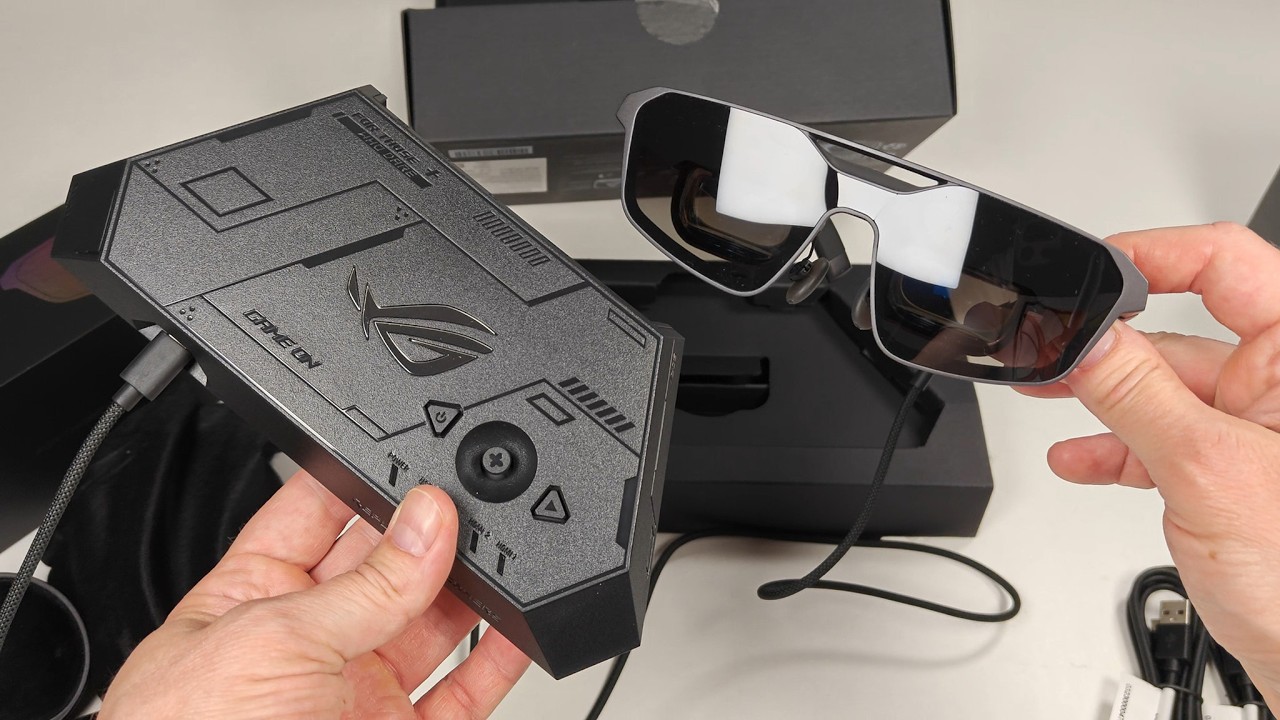
Xreal ROG R1 is a pair of smart glasses jointly designed by Xreal and Asus, featuring industry-leading 240Hz micro-OLED displays and a unique desktop dock with multiple input options. ROG R1 also supports the Xreal Eye camera and prescription glasses inserts.
ROG R1 can be used independently of this dock, which is how I used them the vast majority of the time during my five weeks of use, including a week's vacation away from home and one particularly long travel day spent in airports and on planes with the glasses.
Xreal Rog R1 retails for $849.99 and can be purchased at Best Buy, Xreal's website, or Asus' website. The box includes the glasses, a USB-C cable for the glasses, a microfiber cleaning cloth, a manual, three total nosepiece shapes/sizes, a prescription glasses adapter, the desktop dock, plus two USB-A to USB-C cables for the dock.
Display |
Sony micro-OLED |
Resolution |
1920 x 1080 |
Refresh rate |
120Hz standalone, 240Hz when docked |
Brightness |
700-nit peak |
Color support |
8-bit, 106% sRGB. |
FoV |
57-degrees |
IPD |
Narrow size: 57-66mm Broad size: 66-75mm |
Spatial tracking |
3DoF native, 6DoF with optional Xreal Eye |
Electrochromic dimming |
Yes, 3 levels |
3D support |
Side-by-side, automatic AI-converted |
Audio |
Bose speakers |
Temple adjustment |
3 angles, spring hinge with flexible arms |
Dimensions |
153mm x 4.9m x 166mm |
Weight |
90g |
Control dock |
1x USB-C power, 1x USB-C data and power, 1x DisplayPort, 2x HDMI |
Displays aren't the only headliner feature

The ROG R1's displays have a clear advantage, as they're the only pair of smart display glasses with a 240Hz display. That pair of micro-OLEDs runs at 120Hz when connected directly to any device, but connecting the glasses to the included ROG R1 dock unlocks 240Hz mode.
This is achieved through a special chip inside the R1 dock, which provides the extra horsepower needed to run at 240Hz. You'll need a device that can natively push 240Hz to take advantage, however, as the only interpolation mode supported on these glasses is upscaling 60Hz signals to 120Hz. There's no native way to scale 120Hz to 240Hz, which I was disappointed by, but I understand why it's a limitation.
Outside of 240Hz, the optics component of ROG R1 is essentially the same as in Xreal One Pro. When not plugged into the dock, it supports the same color and brightness output, plus the same 57-degree FoV via prism lenses. So, if you're not particularly interested in the 240Hz or dock functions, is there still a reason to choose these over Xreal One Pro? Yes, but only if you enjoy tweaking every last aspect of a device.

Xreal ROG R1 sports the most detailed OSD menu I've ever seen on a pair of smart glasses. There are very few glasses that offer a proper OSD menu — Xreal One was the first — and while I thought Xreal's previous efforts felt like a monitor, ROG R1 takes those options to the next level.
Honestly, the number of features available for both the glasses and the dock is borderline overwhelming. You'll easily spend 30 minutes just scrolling through everything to test them out and, undoubtedly, much longer figuring out your favorite settings.
ROG R1 supports several different presets, too, including custom ones you can save for later use. While I love all the additional (optional) settings, I really enjoyed the refreshed quick settings menu, which lets you instantly adjust brightness, lens tinting, speaker volume, screen size, and screen distance without having to dive through a bunch of annoying menus. Just click the minus button to open this menu.


The temples offer three angle adjustment options, and the left and right temples are independent, so you can find the display angle that best matches your face shape. The three different nose pads further enhance comfort, and the arms all use spring hinges, so they bend backward quite a bit to accommodate different head sizes.
Both Anchor and Smooth Follow modes use low-persistence black frame insertion to eliminate motion blur that can occur with spatially tracked virtual screens, and both 3DoF and 6DoF modes use PWM dimming at all levels. The 0DoF mode uses DC dimming at brightness levels 3-10, while levels 1 and 2 use PWM dimming.
These are 8-bit displays with no 10-bit support, so there should be no dithering at all. Despite the PWM dimming, I found these glasses quite comfortable with the prescription inserts. Normally, low-frequency PWM dimming (240-1000Hz) hurts my eyes and gives me a headache, but Xreal appears to be following the refresh rate here (120Hz), which typically doesn't bother me.
The dock changes everything

No other pair of smart display glasses to date ships with a dock like ROG R1. This dock sports two HDMI ports, one DisplayPort, and two USB-C ports on the back (one is power), plus a USB-C port on the front for your glasses. This means you can easily connect multiple computers or consoles to the dock and switch between them using the buttons on top of the dock, similar to a KVM switch.
Better yet, each button and joystick direction can be customized to perform virtually any feature or function toggle supported by the dock, so you can truly nail down your ideal configs and have them ready with a single press.


While the dock is phenomenal for providing 240Hz support and expanding preset and monitor parameter adjustment options, it's also a weird downgrade for spatial tracking and quick settings.
While the glasses alone support five quick settings for adjustment, plugging them into the dock removes the audio adjustment option. It's also cumbersome to switch between spatially-tracked modes and 0DoF mode, as you either have to set it to one of the quick buttons on top or dig through a few menus. Note that 6DoF requires the Xreal Eye attachment for the glasses, which can't be used with prescription lenses.
I also find it irritating that all the buttons on the glasses are disabled when plugging them into the dock. I understand that Asus/Xreal wants the dock to be the primary option, but it's still annoying for someone who switches between using the dock and plugging the glasses directly into portable devices.

Xreal should be able to address those issues in a firmware update, though, so while this is certainly annoying in its current state, there's no reason it needs to stay that way. Overall, the ROG R1 is an incredible pair of glasses that offers higher-quality imagery and more options than any other pair of smart glasses on the market.
If you're looking for an ultra-clean desk setup with no monitors, this is truly an incredible solution, especially given how well Xreal's spatial tracking system works. I'd still recommend the $450 Xreal 1S for most people, but the ROG R1 is an impressive enthusiast option for gamers seeking the highest-end solution.

