
What you need to know
- Gemini can now remember where you left important items, even without a tracker.
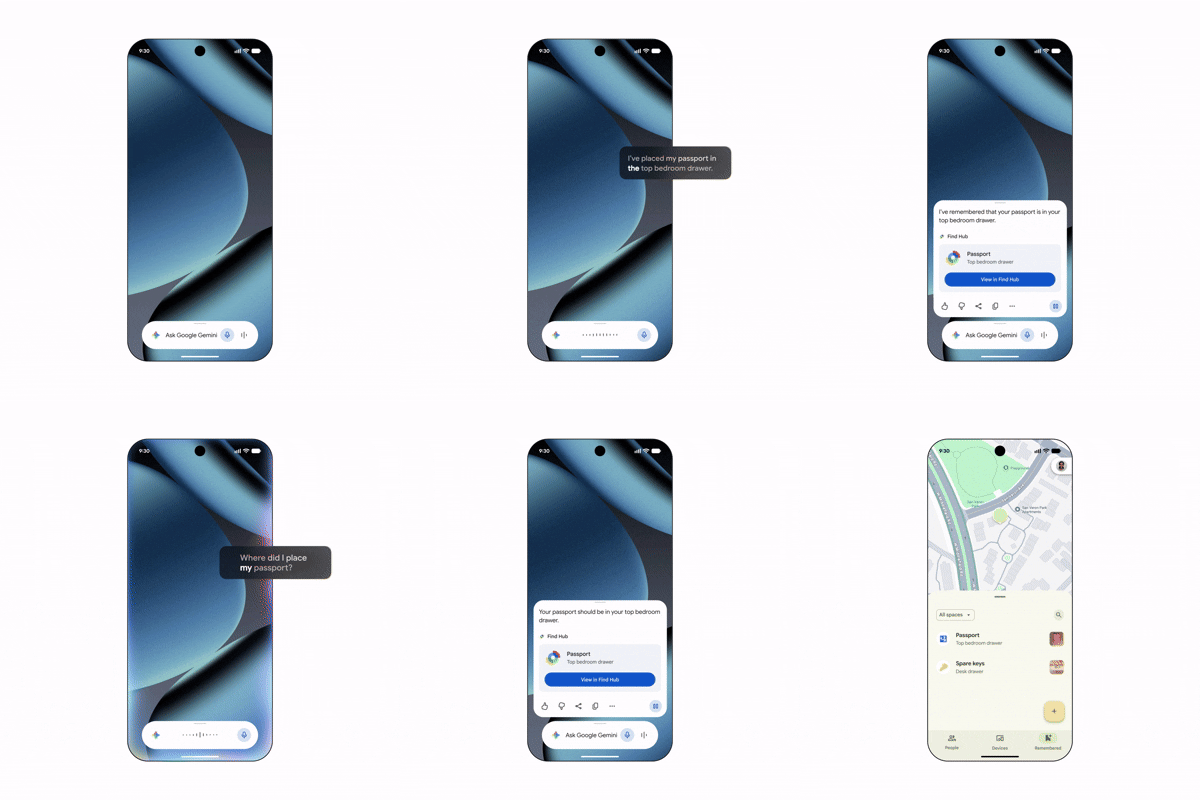
- You can tell Gemini where you stashed an item or snap a quick photo, and it logs the detail directly to Find Hub.
- Then, ask Gemini where your item is later, or view all saved locations in Find Hub's new memory tab.
Google’s September Android Drop is introducing a handy upgrade to Find Hub that allows Gemini to remember where you left important items, even if those items don’t have a tracker attached.
With the latest change, you can tell Gemini where you put an item instead of using a Bluetooth tracker to find it later. For example, you could say, “Hey Google, remember in Find Hub that I put my passport in my bedroom drawer” and optionally attach a photo for additional context.
Gemini then saves that information in a dedicated “remembered items” tab in Find Hub so you can easily get back to it again by just asking where it is.
This feature plugs a hole in Google’s current tracking setup. While Find Hub is ideal for tagged belongings, there are plenty of things you routinely misplace — such as passports, spare keys, documents, or other small essentials — that aren’t worth attaching a tracker to. This new feature essentially provides a lightweight memory layer for those items.
The feature will be rolled out to Android 16 and newer devices in countries where Gemini and Find Hub are supported. Google says it will be available soon.
This is just one part of the September Android Drop, which also includes enhancements such as Motion Assist to help alleviate motion sickness and new upgrades to Google Messages.
However, for those of us who spend far too much time looking for lost items, this new Gemini feature may be the most impactful update of them all.

